This training module provides an in-depth introduction to project management methodologies, frameworks, and tools. Project management is a crucial discipline for successfully planning, executing, and completing projects across various industries. Understanding different methodologies, frameworks, and tools is essential for effective project management. This module will equip participants with the fundamental knowledge required to initiate and manage projects efficiently. Register NOW >>>
Project managers use a variety of terms and concepts to effectively plan, execute, and monitor projects. Here are the top 10 terms that project managers commonly use:
Scope: This refers to the boundaries and objectives of the project, including what is included (in-scope) and what is not included (out of scope).
Timeline: A timeline or project schedule outlines the sequence of activities and their respective durations to complete the project on time.
Budget: Project managers track and manage the budget, which includes all the financial resources allocated to the project.
Risk Management: Project managers identify, assess, and mitigate risks that could impact the project’s success.
PM terminologies Project HQ
Stakeholder: Stakeholders are individuals or groups with an interest in the project, such as sponsors, team members, customers, and suppliers.
Milestone: Milestones are significant events or achievements within a project, often used to measure progress and mark key points in the timeline.
Resource Allocation: This involves assigning and managing the people, equipment, and materials needed to complete project tasks.
Quality Assurance: Project managers ensure that project deliverables meet the predefined quality standards and requirements.
Change Management: Projects often encounter changes in scope, objectives, or requirements. Change management processes help control and document these changes.
Communication Plan: A communication plan outlines how project information is shared among stakeholders, ensuring everyone is informed and engaged throughout the project’s lifecycle.
These terms are fundamental to effective project management and are commonly used in project planning, execution, and reporting. Project managers also use various tools and methodologies to help them manage projects more efficiently, such as Gantt charts, Agile, Scrum, and Six Sigma, to name a few.
Project Management in practice – Real world scenario
Project Management in a Real world
Managing an app development project in the real world requires careful planning, effective communication, and continuous monitoring. Here’s a practical step-by-step guide for a project manager:
1. Define Project Goals and Objectives:
Start by understanding the app’s purpose and target audience.
Define clear, measurable goals and objectives for the project.
Establish a project charter that outlines the project’s scope, objectives, stakeholders, and constraints.
2. Build Your Project Team:
Identify the key roles and responsibilities needed for the project, such as developers, designers, testers, and a product owner.
Assemble your project team, considering their expertise and availability.
3. Develop a Project Plan:
Create a detailed project plan that includes tasks, milestones, timelines, and resource allocation.
Use project management software like Microsoft Project, Asana, or Trello to track progress.
4. Define Scope and Requirements:
Work closely with stakeholders to gather and document the app’s functional and non-functional requirements.
Prioritize features and functionalities to create a Minimum Viable Product (MVP).
5. Create a Project Schedule:
Develop a project timeline with specific deadlines for each task or milestone.
Consider potential risks and contingencies when setting deadlines.
6. Allocate Resources:
Ensure that the team has access to the necessary tools, equipment, and software licenses.
Monitor resource allocation to avoid overloading team members.
7. Risk Management:
Identify potential risks that could impact the project’s success.
Develop a risk management plan with mitigation strategies and assign responsibilities for risk monitoring.
8. Communication Plan:
Establish a clear communication plan that defines how team members will collaborate and share updates.
Hold regular meetings to discuss progress, challenges, and next steps.
9. Development and Testing:
Supervise the app development process, ensuring that it aligns with the project plan and meets quality standards.
Implement an agile development methodology if appropriate.
Conduct thorough testing, including unit testing, integration testing, and user acceptance testing.
10. Monitor Progress:
Continuously monitor project progress and track against the project plan.
Use key performance indicators (KPIs) to measure success and identify areas for improvement.
11. Stakeholder Engagement:
Keep stakeholders informed about project status and address their concerns promptly.
Gather feedback throughout the development process to make necessary adjustments.
12. Deployment and Launch:
Plan and execute the deployment of the app to the intended platforms (iOS, Android, web, etc.).
Coordinate a successful app launch, including marketing and promotion efforts.
13. Post-Launch Evaluation:
Monitor the app’s performance in the real world and gather user feedback.
Plan for post-launch updates and improvements based on feedback and data.
14. Project Closure:
Review the project against the initial goals and objectives.
Conduct a post-project review to identify lessons learned and areas for improvement.
15. Documentation:
Ensure all project documentation, including requirements, design, and code, is well-maintained for future reference.
Throughout the project, adapt to changes and challenges as they arise. Effective project management involves flexibility, proactive problem-solving, and a focus on delivering a successful app that meets user needs and business goals.
https://www.projecthq.live/wp-content/uploads/2023/10/logo-1c.png00adminhttps://www.projecthq.live/wp-content/uploads/2023/10/logo-1c.pngadmin2023-10-03 15:17:292023-10-03 15:17:29Project Management in practice – Real world scenario
Passing the Project Management Professional (PMP) exam from the Project Management Institute (PMI) on your first attempt requires careful preparation and a structured study plan. Here are steps to help you succeed:
Eligibility and Prerequisites:
Ensure you meet the eligibility criteria outlined by PMI. Typically, you need a four-year degree, 36 months of leading projects, and 35 hours of project management education. If you have a secondary degree, you’ll need 60 months of experience and the same 35 hours of education.
Understand the PMP Exam Format:
The PMP exam is a computer-based test consisting of 200 multiple-choice questions.
You have 4 hours to complete the exam.
Questions are based on PMI’s PMBOK (Project Management Body of Knowledge) guide.
Create a Study Plan:
Develop a structured study plan that outlines what you will study and when.
Consider dedicating at least 2-3 months to preparation.
Use PMI’s Official Materials:
PMI provides official study materials, including the PMBOK guide, which is the primary reference for the exam.
Use PMI’s official PMP Handbook for detailed information about the exam and requirements.
Study Resources:
Invest in reputable PMP exam preparation resources, such as textbooks, online courses, practice exams, and flashcards.
Look for materials that align with the latest PMBOK guide edition.
Practice Exams:
Take practice exams regularly to get comfortable with the question format and to assess your knowledge.
Focus on understanding why you got certain questions wrong.
Join a Study Group:
Consider joining or forming a study group with other PMP aspirants.
Group discussions can help clarify concepts and reinforce learning.
Understand PMBOK Concepts:
Master the key concepts in the PMBOK guide, such as the five process groups and ten knowledge areas.
Understand how they relate to each other.
Time Management:
Practice time management during your study sessions to simulate exam conditions.
Focus on Weak Areas:
Identify your weak areas and allocate more study time to them.
Don’t neglect any knowledge area, as each is important for the exam.
Memorization and Understanding:
Don’t just memorize concepts; strive to understand them.
Focus on the application of project management principles.
Simulate Exam Conditions:
Take full-length practice exams under timed conditions to simulate the actual exam experience.
Stay Updated:
Ensure you are studying based on the most recent version of the PMBOK guide and any updates from PMI.
Relaxation and Well-being:
Manage stress and take care of your physical and mental health during your preparation.
Exam Day Preparation:
Get a good night’s sleep before the exam.
Arrive at the testing center well in advance.
Bring required identification and materials as specified by PMI.
During the Exam:
Read questions carefully and thoroughly.
Answer all questions; there is no penalty for guessing.
Use the provided tools (scratch paper or on-screen calculator) if needed.
Manage your time wisely.
Review and Double-Check:
Before submitting your exam, review your answers if time allows.
Post-Exam:
Celebrate your accomplishment.
If you pass, focus on maintaining your PMP certification through continuing education.
Remember that the PMP exam is challenging, and success depends on thorough preparation. Stay committed, stick to your study plan, and approach each question methodically to increase your chances of passing on your first attempt.
https://www.projecthq.live/wp-content/uploads/2023/10/logo-1c.png00adminhttps://www.projecthq.live/wp-content/uploads/2023/10/logo-1c.pngadmin2023-09-29 10:51:012023-09-29 11:38:55Passing the Project Management Professional (PMP) exam from the Project Management Institute (PMI) on your first attempt
A daily stand-up meeting, also known as a daily scrum or daily huddle, is a brief team meeting that helps keep everyone on the same page, aligned with project goals, and aware of potential roadblocks. Here are the steps to conduct a daily stand-up meeting effectively:
Choose a Convenient Time and Place:
Select a consistent time that works for all team members.
If possible, hold the meeting in the same physical location every day. If your team is remote, use a video conferencing tool.
Invite Relevant Team Members:
Ensure that everyone who needs to be informed or can provide valuable input is invited to the meeting.
Keep It Short:
The meeting should be time-boxed to 15 minutes or less. This encourages brevity and ensures that the meeting doesn’t disrupt the workflow.
Stand Up:
Encourage participants to stand during the meeting. This helps keep the meeting short and focused.
Use a Round-Robin Format:
Start with one team member and go around the circle (or virtual room) to give each person an opportunity to speak.
Answer Three Key Questions:
Each team member should answer three questions:
What did you do yesterday?
What will you do today?
Are there any obstacles or blockers in your way?
Listen Actively:
Team members should actively listen to each other’s updates. Avoid side conversations or distractions.
Avoid Problem Solving:
If someone mentions a blocker, it’s not the time to solve the problem in detail. Instead, note the issue and plan to address it after the stand-up.
Keep It Focused:
The meeting should only cover topics directly related to the daily tasks and progress. Avoid drifting into unrelated discussions.
Maintain a Positive Tone:
Encourage a positive atmosphere where team members feel comfortable sharing their progress and challenges.
Use Visual Aids (Optional):
You can use a physical or digital board to visually represent the tasks and progress, such as a Kanban board or task board.
End on Time:
Respect everyone’s time by ending the meeting promptly, even if not everyone has spoken. Follow up individually if necessary.
Follow-Up and Action Items:
After the stand-up, address any blockers or issues that were raised. Assign tasks to resolve them and keep the team updated.
Iterate and Improve:
Regularly evaluate the effectiveness of your daily stand-up meetings and make adjustments as needed to ensure they remain valuable and efficient.
Remember that the primary purpose of a daily stand-up is to keep the team informed, identify and address obstacles, and promote collaboration. By following these steps, you can conduct productive daily stand-up meetings that contribute to the success of your projects.
https://www.projecthq.live/wp-content/uploads/2023/10/logo-1c.png00adminhttps://www.projecthq.live/wp-content/uploads/2023/10/logo-1c.pngadmin2023-09-29 10:46:152023-09-29 10:46:56Daily stand up meeting – Scrum Agile event. Step by step
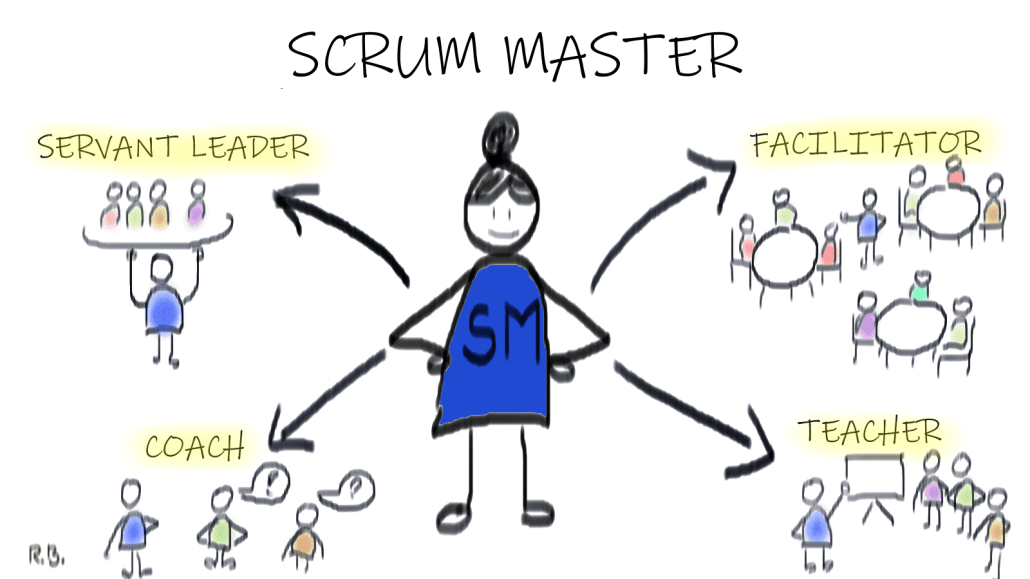
A Scrum Master plays a critical role in the Agile development process, facilitating the Scrum framework and helping the Scrum team (usually a group of software developers) work effectively. While the specific daily tasks of a Scrum Master can vary depending on the team’s needs and the organization’s practices, here are some common activities they typically engage in on a daily basis:
Team Facilitation: The Scrum Master helps the Scrum team stay focused on its goals and facilitates daily stand-up meetings (daily scrum) where team members discuss their progress, plans, and any obstacles.
Removing Obstacles: They work to remove impediments or obstacles that hinder the team’s progress. This might involve liaising with other teams or departments to address issues or finding solutions to technical challenges.
Maintaining the Scrum Process: The Scrum Master ensures that the team follows the Scrum framework’s practices, including sprint planning, sprint review, and sprint retrospective meetings. They help the team stay on track and adhere to timeboxing.
Protecting the Team: Scrum Masters shield the team from external distractions and interruptions, allowing them to focus on the work they’ve committed to during the sprint.
Coaching and Mentoring: Scrum Masters coach team members and the Product Owner on Agile principles and practices, helping them continuously improve their skills and understanding of the process.
Continuous Improvement: They promote a culture of continuous improvement within the team. This includes conducting retrospectives to identify areas for improvement and implementing changes to enhance the team’s performance.
Communication: Scrum Masters facilitate communication within the team and between the team and stakeholders. They ensure that everyone has the information they need to make informed decisions.
Monitoring Progress: Scrum Masters track the team’s progress toward its sprint goals and ensure that work is being completed according to the Definition of Done.
Servant Leadership: They embody the concept of servant leadership by supporting the team’s self-organization, fostering a collaborative environment, and being responsive to the team’s needs.
Documentation: Scrum Masters may also be responsible for maintaining relevant documentation, such as burndown charts, velocity reports, and other metrics that help the team and stakeholders understand the project’s status.
Conflict Resolution: They help resolve conflicts within the team, promoting a positive and collaborative working atmosphere.
Training and Education: Scrum Masters may organize training sessions or workshops to improve team members’ knowledge of Agile and Scrum practices.
It’s important to note that the specific daily activities of a Scrum Master can vary based on the team’s maturity, the organization’s culture, and the unique challenges of a given project. The Scrum Master’s primary goal is to support the team in delivering high-quality products and continuously improving their processes.
https://www.projecthq.live/wp-content/uploads/2023/10/logo-1c.png00adminhttps://www.projecthq.live/wp-content/uploads/2023/10/logo-1c.pngadmin2023-09-29 10:42:042023-09-29 10:42:27A day in life of a scrum master
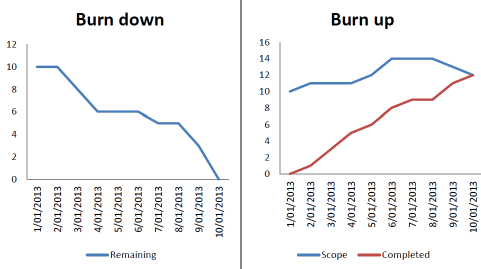
“Burn up” and “burn down” charts are two common types of project management tools used in Agile methodologies to track and visualize the progress of tasks or work items within a project. These charts help project teams understand how work is progressing and whether they are on track to meet their goals.
Burn Up Chart:
A burn-up chart is used to track the cumulative progress of work items over time.
The x-axis represents time (usually in iterations or sprints), while the y-axis represents the amount of work completed.
As work items are completed, they are added to the chart, showing the total amount of work done at any given point in time.
The chart typically includes two lines: one showing the actual work completed, and another showing the scope or total work that was initially planned.
The gap between the two lines can help the team assess whether they are on track to complete all planned work within the time frame.
Burn Down Chart:
A burn-down chart, on the other hand, is used to track the remaining work over time.
The x-axis represents time (usually in iterations or sprints), while the y-axis represents the amount of work remaining.
Initially, the chart shows the total planned work, and as work items are completed, the line representing remaining work should trend downwards.
The goal of a burn-down chart is to ensure that the remaining work is gradually decreasing, indicating progress toward project completion.
Deviations from the expected burn-down line can help the team identify issues or changes in scope.
Both burn-up and burn-down charts provide visual representations of project progress, helping teams identify trends, make informed decisions, and adapt their plans as needed during the project’s lifecycle. These charts are commonly used in Agile methodologies like Scrum and Kanban to promote transparency and facilitate effective communication within the team and with stakeholders.
https://www.projecthq.live/wp-content/uploads/2023/10/logo-1c.png00adminhttps://www.projecthq.live/wp-content/uploads/2023/10/logo-1c.pngadmin2023-09-29 10:36:342023-09-29 10:42:37Burn up and burn down chats explained
Agile estimation techniques are used in Agile software development methodologies, such as Scrum and Kanban, to estimate the effort, time, and complexity of various tasks or user stories within a project. These techniques help teams make informed decisions, prioritize work, and plan their iterations effectively. Here are some common Agile estimation techniques:
Planning Poker (Relative Estimation): In Planning Poker, team members use a deck of cards with numbers representing estimates (e.g., Fibonacci sequence or modified Fibonacci sequence) to estimate the relative size or complexity of user stories. Team members discuss their estimates and reach a consensus. This technique encourages team collaboration and avoids anchoring bias.
T-shirt Sizing: Instead of using numbers, teams can use t-shirt sizes (XS, S, M, L, XL) to estimate user stories. This technique is less precise than Planning Poker but can be quicker and is useful for high-level estimations.
Dot Voting: Each team member is given a certain number of dots (votes), and they use these dots to vote on the estimated effort or complexity of user stories. It’s a simple and quick way to prioritize items on a backlog.
Bucket System: In the bucket system, user stories are divided into different buckets based on their complexity or size, such as “Small,” “Medium,” and “Large.” This approach is less granular than Planning Poker and can be faster for estimating large backlogs.
Story Points: Teams assign story points to user stories based on their complexity and effort required. Story points are a relative measurement and don’t represent specific units of time. Common scales include Fibonacci or powers of 2.
Ideal Days or Hours: Some teams prefer to estimate in ideal days or hours, representing the actual time they expect a task to take if no interruptions or delays occur. This technique is less common in Agile but may be used in some situations.
Reference Stories: Teams use previously completed user stories as reference points to estimate new ones. This approach leverages historical data and helps maintain consistency in estimation.
Three-Point Estimation: This technique involves assigning three values to each user story: the best-case estimate, the worst-case estimate, and the most likely estimate. These values are used to calculate a weighted average, providing a more probabilistic estimate.
Affinity Estimation: This technique involves grouping user stories into categories or clusters based on their similarities in complexity or effort. It can help identify patterns and simplify estimation.
Monte Carlo Simulation: Teams use statistical techniques and simulations to estimate project completion dates and identify potential risks. It involves running multiple simulations to account for uncertainty in estimates.
Remember that Agile estimation is not about achieving perfect accuracy but about facilitating communication, collaboration, and prioritization within the team. Teams should continually refine their estimation techniques and adapt them to their specific needs and context.
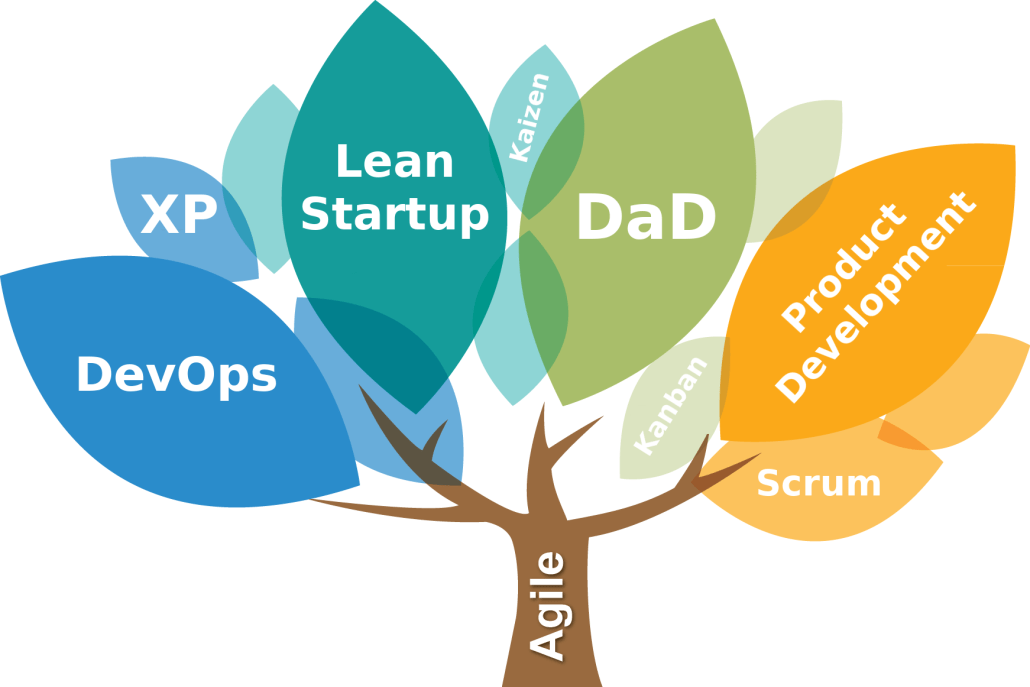
Agile is a project management and product development approach that emphasizes flexibility, collaboration, customer feedback, and continuous improvement. There are various tools and techniques used in Agile methodologies to facilitate the Agile process. Here are some of the most common ones:
1. User Stories: User stories are simple, concise descriptions of a feature from an end user’s perspective. They are used to define the functionality that needs to be developed and serve as the basis for prioritizing work.
2. Kanban Boards: Kanban is a visual management tool that helps teams track work items through various stages of development. It uses columns to represent stages of work (e.g., To Do, In Progress, Done) and cards to represent individual tasks or user stories.
3. Scrum Framework: Scrum is an Agile framework that divides work into time-boxed iterations called sprints. It includes roles like Scrum Master and Product Owner, as well as events like Daily Standups, Sprint Planning, Sprint Review, and Sprint Retrospective.
4. Sprint Backlog: The sprint backlog is a list of tasks or user stories that a development team commits to completing during a sprint. It is a subset of the product backlog.
5. Burndown Charts: Burndown charts are used to visualize the progress of work during a sprint. They show the remaining work (usually in story points or hours) over time, helping teams stay on track to meet their sprint goals.
6. Velocity: Velocity is a metric used in Scrum to measure the amount of work a team can complete in a sprint. It helps with estimating how much work can be done in future sprints.
7. Daily Standup Meetings: Also known as Daily Scrum meetings, these are short, daily meetings where team members discuss what they worked on the previous day, what they plan to work on today, and any obstacles they are facing.
8. Retrospectives: After each sprint, teams hold retrospective meetings to reflect on what went well, what didn’t, and how to improve their processes. This encourages continuous improvement.
9. Test-Driven Development (TDD): TDD is a software development technique where tests are written before the code. It ensures that the code meets the desired functionality and can be used for regression testing.
10. Continuous Integration (CI) and Continuous Deployment (CD): CI/CD tools automate the process of integrating code changes into a shared repository, running automated tests, and deploying to production. This promotes a continuous delivery pipeline.
11. Pair Programming: In pair programming, two developers work together at one computer. One writes the code, and the other reviews it in real-time. It promotes collaboration and improves code quality.
12. Agile Estimation Techniques: Methods like Planning Poker or Relative Sizing are used to estimate the effort required for user stories or tasks. This helps with prioritization and sprint planning.
13. Story Mapping: Story mapping is a visual technique that helps teams understand the big picture of a project by arranging user stories into a logical sequence or map.
14. Burnup Charts: Similar to burndown charts, burnup charts show both completed and planned work over time. They provide a clearer view of progress, especially when scope changes.
These are just some of the many tools and techniques used in Agile methodologies. The specific tools and techniques employed can vary depending on the Agile framework (e.g., Scrum, Kanban) and the needs of the team or organization.
Project management involves planning, executing, and controlling a project from start to finish to achieve specific goals within a set timeframe and budget. Various tools and techniques are available to help project managers effectively manage their projects. Here are some essential project management tools and techniques:
1. Project Management Software:
Microsoft Project: A popular project management software for creating schedules, tracking progress, and managing resources.
Trello: A visual task and project management tool that uses boards, lists, and cards to organize tasks.
Asana: A versatile project management tool that offers task management, team collaboration, and project tracking features.
Jira: Particularly useful for software development projects, Jira helps manage tasks, track issues, and facilitate agile development.
2. Gantt Charts: Gantt charts are visual representations of project schedules. They help project managers plan tasks, assign resources, and track progress over time.
3. Work Breakdown Structure (WBS): A hierarchical breakdown of project tasks into smaller, manageable components. It helps define the scope of the project and provides a clear view of the work to be done.
4. Critical Path Method (CPM): CPM is a technique for identifying the sequence of tasks that must be completed on time to ensure the project finishes as planned. It helps identify the critical path, which is the longest path through the project schedule.
5. PERT (Program Evaluation and Review Technique): PERT is a probabilistic project management technique that uses three estimates for each task duration: optimistic, pessimistic, and most likely. It calculates a weighted average to estimate project duration and identify critical tasks.
6. Agile Project Management: Agile methodologies like Scrum and Kanban focus on iterative development and customer collaboration. They emphasize flexibility and adaptability to changing project requirements.
7. Earned Value Management (EVM): EVM is a project performance measurement technique that integrates scope, schedule, and cost measurements to assess project progress. It helps project managers track the value of work completed relative to the planned cost.
8. Risk Management: Risk management tools and techniques help identify, assess, and mitigate project risks. Tools like risk matrices, risk registers, and Monte Carlo simulations can be used to manage uncertainties.
9. Communication Tools: Effective communication is crucial in project management. Tools like email, instant messaging, project management software, and collaboration platforms facilitate communication among team members and stakeholders.
10. Resource Management Tools: These tools help allocate and manage resources efficiently. Resource calendars, resource leveling, and resource allocation matrices are examples of resource management techniques.
11. Quality Management Tools: Quality management tools, such as Six Sigma, Total Quality Management (TQM), and quality control charts, help ensure that project deliverables meet quality standards.
12. Stakeholder Analysis and Engagement Tools: Techniques like stakeholder analysis matrices and communication plans help identify and engage with project stakeholders effectively.
13. Change Control Tools: Change control boards, change request forms, and change impact assessments help manage changes to project scope, schedule, or budget.
14. Issue Tracking Tools: These tools help track and manage project issues, ensuring they are resolved promptly to avoid project delays.
15. Lessons Learned Repositories: Documenting lessons learned throughout the project helps improve future project management processes.
Selecting the right combination of tools and techniques depends on the project’s size, complexity, and specific requirements. Effective project managers often adapt and combine various tools and techniques to suit their project’s unique needs.